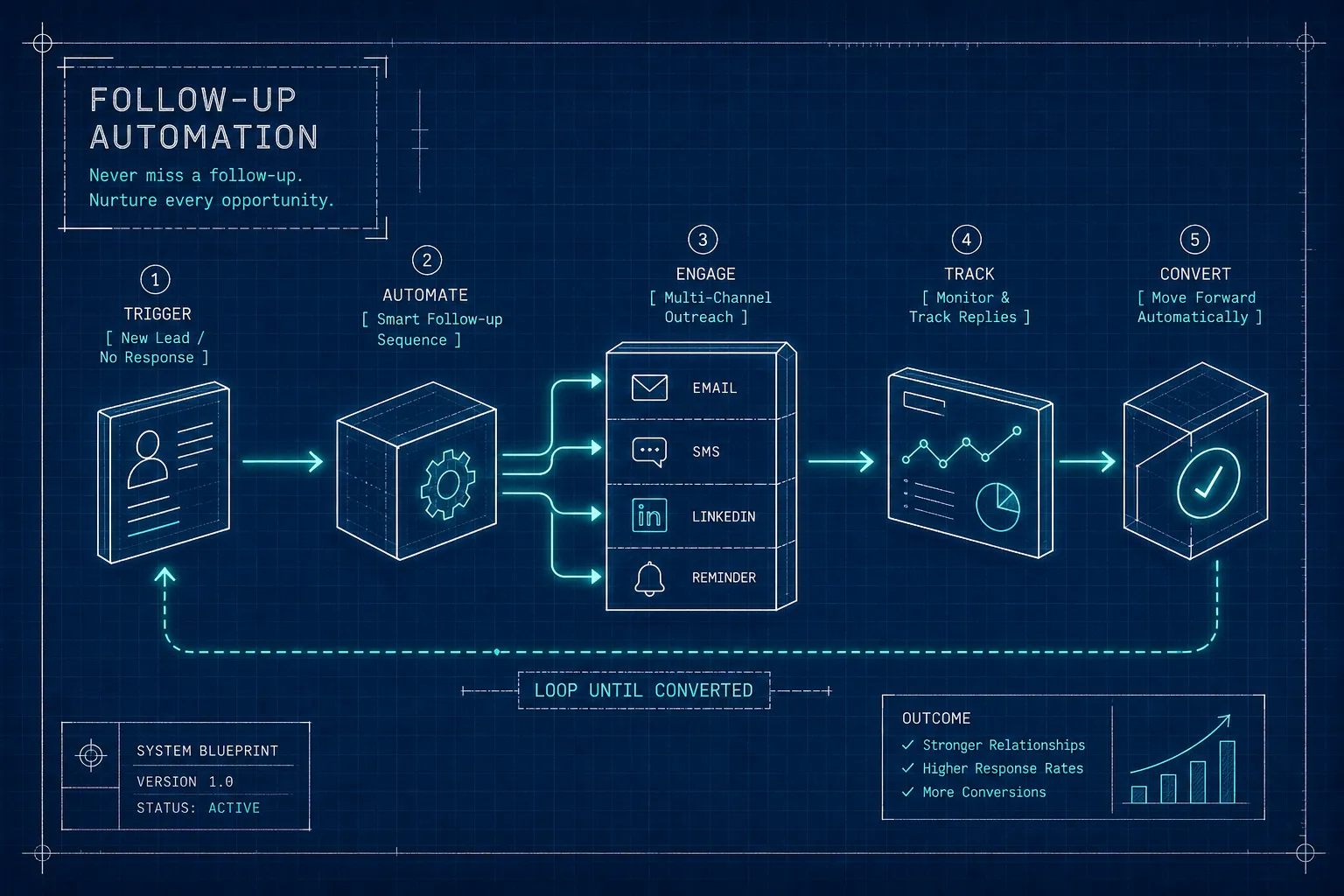
Business follow-up automation is what separates service businesses that convert enquiries consistently from those that lose leads to a competitor before Thursday arrives. A qualified lead fills in your contact form on a Tuesday afternoon. You see the notification, make a mental note to follow up, and then a client call runs long, someone needs an invoice approved, and by Thursday that lead has signed elsewhere. This is not a discipline problem. It is a systems problem, and it happens in service businesses every single day.
Automated follow-up sequences exist to close that gap consistently. When the system handles the outreach, the sequence runs the same way whether you are in a meeting, on leave, or simply having a busy week. The trigger fires, the message goes out, and the lead keeps moving through your pipeline without anyone pressing send manually.
This guide covers what business follow-up automation actually means in practice, how triggers connect to email and SMS sequences, which tools suit different business setups, how to stay compliant with South African law, and how to measure whether the system is doing its job.
Once the workflow is mapped, our guide to building automated follow-up emails that convert will help you turn the logic into a useful message sequence.
What follow-up automation actually means for your business
Most business owners already follow up on leads in some form. They set a reminder in their phone, write a name on a sticky note, or flag an email to revisit later. That is not automation. Automation means a pre-built sequence of messages, tasks, or calls fires automatically based on something the contact did or did not do, without anyone making a manual decision to send.
The distinction matters because reminders depend on the person remembering to act on them. A sequence does not. It runs on logic: if this event happens, send this message, wait this many days, then do this next.
Consider an illustrative example: a service business receiving 20 enquiries a month and manually following up on six. The other 14 are not being ignored out of laziness. They fall through because there is no repeatable system holding them in place. The problem is never effort; it is the absence of a reliable process that runs the same way every time, for every lead, regardless of how busy the week gets.
Business follow-up automation: triggers, email sequences, and SMS workflows
A trigger is the event that starts the whole automation chain. Common trigger types include a form submission, a tag applied to a contact, a deal moving to a new pipeline stage, a link clicked in an email, or a period of inactivity after a set number of days. Each trigger tells the system: something has changed, now act.
A practical example makes this concrete. A prospect books a discovery call through your website. The CRM tags them as "booked." An email confirmation fires immediately. A reminder SMS goes out 24 hours before the call. The morning after the call, a post-call follow-up sequence starts automatically, beginning with a recap email and moving into a value-add sequence over the following two weeks. No manual steps. No dropped balls.
Email sequences suit longer, value-driven communication: proposals, case studies, check-in messages, and nurture content. SMS works better for time-sensitive nudges such as appointment reminders, quick re-engagement pings, or short confirmations. Research into multi-channel follow-up indicates that using both channels together often outperforms a single-channel approach, because each medium earns its place for a specific job in the sequence.
The key principle is that each touch should add a new angle rather than repeat the previous message. A sequence that says "just checking in" three times in a row is not automation; it is noise. Think of each message as a distinct reason to re-engage: a relevant insight, a proof point, a direct question, something that moves the conversation rather than stalling it.
Business follow-up automation tools that work without a technical team
The right tool depends on what your business needs right now, not what looks most impressive in a demo. For service businesses that want CRM and automation in one place, HubSpot connects follow-up sequences directly to deal stages, contact properties, and sales pipeline data, a solid option when marketing and sales need to share the same information.
For deeper behavioural workflows and lead scoring at a lower cost, ActiveCampaign gives non-technical owners a visual builder that is generally faster to configure and more affordable to run. Brevo suits budget-conscious setups that also need SMS and transactional email in the same platform. MailerLite works well for simpler sequences where less configuration overhead is a priority. Each platform has a different ceiling, so matching the tool to your current complexity, rather than your aspirational one, saves significant time and budget.
Not every business needs a full CRM automation suite. Tools like Zapier and Make (formerly Integromat) let you connect a form builder, a CRM, an email platform, and an SMS gateway without writing a single line of code. They work as a bridge between tools that do not natively communicate with each other. A native workflow engine is the smarter choice when all your automation happens inside one platform. A connector layer makes more sense when you are linking three or four separate tools together.
For service business owners who know they need these systems but do not want to spend weeks inside workflow builders, Pixel Panda can help map the follow-up journey, select tools suited to the business's complexity, and wire everything together so the automation runs around how you actually work, rather than requiring you to adapt to a platform's logic.
Building your first sequence: map before you build
The most common implementation mistake is opening a platform and starting to build before the logic is clear. Before touching any tool, map the journey on paper or a whiteboard. Identify the trigger event, list every touchpoint in order, assign a channel and timing to each one, and define what "done" looks like: a reply received, a call booked, a proposal signed. A five-touch sequence over 14 days is a strong starting point for most B2B service businesses, and a useful foundation for more advanced sales follow-up sequencing later.
A practical cadence that performs well across professional services looks like this:
- Day 0: immediate confirmation that recaps the next step clearly - Day 2, 3: a value-add email with a relevant resource, example, or insight - Day 5, 7: a short case study or proof point from a similar client - Day 10: a specific, short question that is easy to answer - Day 14: a clean, respectful close-the-loop message
Each message should follow a simple structure: a hook that earns attention, a piece of value that is genuinely useful, and one clear ask. The sequence should pause the moment someone replies or books a call. Continuing to send after a contact has responded is one of the fastest ways to damage trust in a system that should be building it. Having follow-up templates and sequences mapped out before you build also makes ongoing optimisation far simpler, you can test one variable at a time rather than guessing what changed.
POPIA compliance for automated email and SMS
South Africa's Protection of Personal Information Act (POPIA) requires prior opt-in consent for electronic direct marketing, including automated email and SMS sequences sent to prospective customers. This is not optional and it is not a technicality. If your follow-up sequence is promoting your services to someone who has not explicitly consented to receive marketing from you, section 69 of the Act applies directly.
The existing-customer exception is narrower than most businesses assume. It applies only when the contact's details were collected in the context of a prior sale, the follow-up relates specifically to your own similar products or services, and the customer was given a clear opt-out opportunity both when their details were collected and in every subsequent message. POPIA also specifies that you may approach a data subject only once to request consent, provided that consent has not previously been refused. A refusal must be treated as permanent.
Building consent into the system from the start is far easier than retrofitting it later. Use an unchecked checkbox with specific wording at the point of capture. Record the timestamp, source, and wording of consent inside your CRM. Trigger automated sequences only for contacts with valid consent records. Maintain a live suppression list for anyone who opts out, and make sure that list is respected across every platform you use. A safe consent statement includes the company name, the channels covered (email, SMS, or both), the types of messages the person will receive, and a clear statement that they can withdraw consent at any time.
Measuring whether your business follow-up automation is working
Before the sequence goes live, define what a conversion means for your business. Without that definition, there is nothing to measure against. For most service businesses, the conversion event is a booked call, a completed enquiry form, or a signed proposal. Pick one, record it in the platform, and track it from the start.
The metrics that matter most for automated follow-up sequences are open rate as a directional signal (industry benchmarks for automated sequences sit around 30%, based on data published by platforms such as Brevo), click rate as a more reliable engagement indicator (2, 4% is a reasonable B2B services target), reply rate for sales sequences, and conversion rate tied to the specific outcome you defined. Open rate alone is not a reliable decision-making metric because inbox privacy features affect it significantly. Click rate and reply rate tell you far more about genuine engagement.
Give the sequence time before drawing conclusions. As a practical rule of thumb, wait until at least 30 to 50 contacts have moved through it before making changes, this gives you enough data to spot patterns rather than reacting to noise. If open rates are low, test subject lines. If click rates are low, revisit the call to action or the value being offered. If replies drop off after touch two, the cadence may be too fast or the angle is not shifting enough between messages. The goal is a system that improves with data over time, not one that runs unchanged indefinitely and quietly underperforms.
The system that pays for itself
Business follow-up automation is not a luxury reserved for large teams with technical staff. It is a repeatable process that any service business can run with the right tools and a clear map of the journey. The steps are straightforward: understand what a trigger-based sequence looks like, choose tools that match your actual complexity, map the sequence before building it in a platform, build consent into the system from day one, and measure what the data tells you after enough contacts have moved through.
Many service businesses are sitting on leads they never converted simply because no consistent follow-up process existed. That is a fixable problem. Setting up automated business follow-ups does not require a developer or a technical background, it requires a clear process, the right platform for your complexity, and the discipline to measure what the data shows.
If you want the system set up without the technical back-and-forth, get in touch with the Pixel Panda team. We map the follow-up journey, select the right tools for your business, and build the automation around how you actually work. Start with a free website audit to see where your biggest conversion gaps are right now.